
ERPNext CRM
Capture every enquiry as a lead, follow it through opportunities and quotations, and hand it to sales without re-typing. Because CRM is part of ERPNext, a won deal becomes a sales order with the same customer, items and prices.
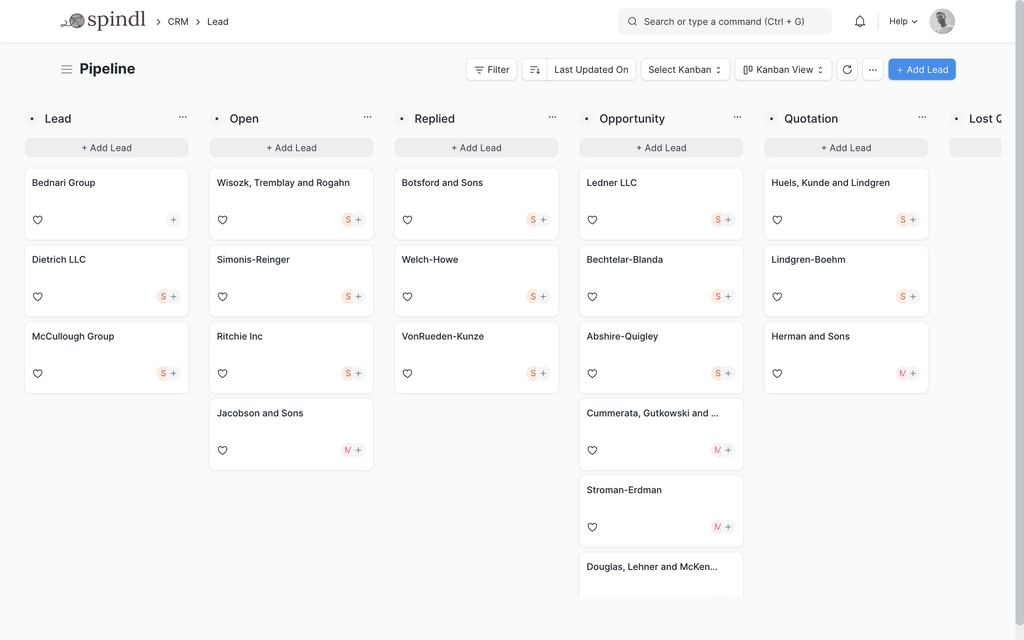
DocumentsLead · Opportunity · Quotation · Customer
ReportsSales pipeline · Lead details · Opportunity summary · Campaign efficiency
Works withSelling · Accounting · Projects
Inside ERPNext CRM
Leads
Enquiries from any source, with status, owner, source and campaign recorded on each lead.
Opportunities
Potential deals with the items, value, probability and sales stage they are at.
Quotations
Quotations from the same item and price data used for orders, printed in your format.
Customers and contacts
Customers, contacts and addresses shared with selling and accounting.
Communication history
Emails, comments and follow-ups linked to the lead, opportunity or customer they are about.
Campaigns
Campaigns and email campaigns, with leads linked to the campaign that brought them in.
Appointments
Appointments booked against leads and customers.
Territories and teams
Territories, customer groups and sales persons for reporting and assignment.
How the documents flow
Each step is a document in ERPNext, linked to the one before it, so you can follow any transaction from start to finish.
Lead
An enquiry from a website form, email, call or event.Opportunity
A qualified lead with a potential deal attached.Quotation
A priced offer built from your items and price lists.Sales Order
The won deal, which moves into selling, stock and invoicing.
Common problems it solves
Enquiries get lost
When leads live in inboxes and spreadsheets, some are never answered. In ERPNext each one has an owner and a status.
Follow-ups are forgotten
Assignments and reminders make sure the next step happens.
Nobody sees the pipeline
The sales pipeline and opportunity reports show what is coming and where deals stall.
Configure, customize, integrate, automate
Standard ERPNext first; custom work only where it earns its place.
Configure
Lead sources, sales stages, territories and customer groups.
Automate
Assignment rules for new leads, follow-up reminders and notifications when a deal changes stage.
Losing track of enquiries?
Tell us where your leads come from and how you follow them up. We’ll show how ERPNext can keep them in one place.